Archive for the ‘ Blackberry ’ category

BlackBerry OS6

It’s been a couple of days since I upgraded my BlackBerry Bold 9700 to OS6, so time enough to provide a quick summary of what’s new and improved.

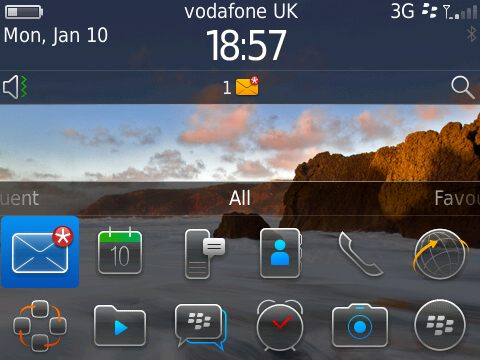
The home screen provides easy access to a number of BlackBerry functions and is more customisable. You can do more with the home screen, such as set the number of rows of applications (none, one or two), scroll between different sets of applications (favourites, frequently-used, media), and start a search just by typing some characters. Clicking in the update area provides a drop-down showing new messages, up-coming appointments and phone events. Click on the image for a larger view.

Social feeds – a new application which provides quick access to notifications from a number of social applications (most notably Twitter and Facebook) and RSS feeds. Quite nice, but more of a convenience factor to go into one application rather than several. Please note that you must have the applications installed.

Updated applications – all of the core standard applications (e-mail, calendar, contacts, text messages) have been updated, some with more impact than others. E-mail seems to have got not much more than a refresh of the user interface, but then I noticed follow-up flags on the menu – is that new? One thing that is new is the pop-up options available when clicking on certain items, such as a name (see screenshot, click for a larger view).

Contacts have received a substantial update, showing recent activity history and also social feed information (for example, view the contact and you’ll see their latest Facebook update). Text messaging continues with the ‘conversational mode’ introduced in OS5, but lays out the conversation better by clearly showing your texts versus your contact’s replies.

The calendar also gets a face-lift. It’s difficult to get a good calendar interface on a small screen, particularly when looking at a week, but I think RIM have done as good a job as possible. It’s much easier to navigate and the improvement to viewing squashed-up overlapping appointments is significant.

Media – I’ve never used a BlackBerry as a music player, but the functionality looks good. The layout for accessing images is improved, and scrolling through them feels pretty speedy.

Web browser – I’ve never been a big browser user on the BlackBerry, only occasionally to find addresses and look at football scores. There’s a new ‘home page’ which makes your bookmarks easily-accessible. Nice, but no big thing.

There’s other nice touches – everything under the Options icon is categorised and illustrated, and the underlying options are better laid-out. The camera is also improved, providing easier access to the flash and options for ‘scenes’ (presets for certain light and subject-matter conditions).

All-in-all BlackBerry OS6 is a very worthwhile update. As with any upgrade you should back up your data first and ensure that you have a technical support route should anything go wrong. Or you could just do what I did and upgrade without considering the consequences, which worked out fine (on this occasion).

{lang: 'en-GB'}

Five reasons why BlackBerry is still winning

This article from TechRepublic is nearly two months old, but remains an interesting read. I’ve observed that, in the past year, interest in iPhones and Android has grown significantly but I’ve yet to meet a customer with a serious strategy around those devices. The trend, as pointed out in the article, is for end users to enthusiastically bring their shiny new devices into work and then ask (expect?) the IT team to get it working with the company’s solutions – mainly e-mail of course.

Right now for me it’s a case of deja-vu (which I’ve experienced before, ho ho)… in the early days of the iPhone, and sporadically ever since, I received numerous e-mails from excited IBMers asking how they can get their iPhone connected to the Domino e-mail infrastructure (I’ve checked my job description, there’s no mention of this responsibility). Now I’m seeing the same with iPad owners. Our official mobile e-mail solution in IBM UK is the BlackBerry but Traveler is starting to gain a foothold, mainly due to the Apple devices.

The article does a good job of pointing out the major advantages of the BlackBerry solution… and solution is the right word. I’ve heard people say that Blackberries are expensive to own, but the infrastructure does provide what an enterprise needs with little or no requirements to add extras in order to make it enterprise-grade and extremely secure.

Since the article was written the iPhone 4 has been announced and I’m sure this will put more pressure on RIM and the other device providers. Consumers will lap it up, and IT departments may groan as expectant iPad / iPhone owners crave to get connected. Whether that trend gets traction in the enterprise space is yet to be seen, but one thing is for sure – consumerisation and end-user-power grows stronger every year.

{lang: 'en-GB'}

BlackBerry Storm 2

Back in October 2008 I blogged about the BlackBerry Storm, RIM’s first touch-screen device. At the time I was totally seduced by the idea of having a full-screen BlackBerry… until I tried it. The usability of the original Storm was deservedly much-maligned, and indeed I spent ten unsuccessful minutes trying to enter my name into the contact list, eventually resulting in the word ‘Dappem’. No, I’m not joking. The design of the device was lovely, the big screen was bright and crisp, but it really was a pain to use… the scrolling was jerky and the movement-sensed screen orientation (executed so well on the iPhone) was random at best. It also didn’t have Wi-Fi, which seemed a major omission that RIM were responding to the iPhone juggernaut.

A while ago I was offered a Storm 2 to try out, and I took possession of it a few days ago. Cosmetically it’s almost identical, the only difference I can see is that the control buttons are now part of the screen panel rather than being separate buttons. Some of the specifications are the same… for example, the screen and the overall dimensions. The key differences (I should say ‘improvements’) are under the hood. The whole touch-screen experience has been revamped – the one under-screen physical button of the first version has been replaced by four corner-located piezoelectric sensors. The result is an all-round better touch experience and more accurate typing. Okay, it does take a bit of getting used to but it doesn’t take long – at first I was hitting ‘r’ instead of ‘e’ every time, but that bad habit has already disappeared. I will admit that the physical keyboard of the other devices is easier to use, but it’s early days and I am speeding up.

Other aspects associated with navigation show huge improvements, namely scrolling (now very smooth) and more reliable screen orientation.

The Storm 2 supports Wi-Fi and 3G, so there’s no longer any major connectivity omissions. It has a 3.2 megapixel camera – not an astounding feature these days, but it has a flash (a win over the iPhone), the picture quality is very good and the fact that you can use a swipe of your finger to zoom in and out is really rather cool.

And there’s a number of other things which are well-implemented – the dialling screen allows you to quickly switch between the dial-pad, call log and contacts (maybe this was in the original Storm, but whatever, it’s a step above the previous BlackBerry devices I’ve used). The message-thread approach to SMS messages is also very good – this may be a feature of OS5 and therefore available on other devices, but I like it anyway.

In summary – the touch-screen experience is a vast improvement on the original, and any small disadvantages in not having a physical keyboard are compensated for by that gorgeous big screen which almost all applications benefit from. If you tried the original Storm and were put off, I’d recommend that you give the new model a chance to win your affections.

{lang: 'en-GB'}

Lotusphere on the move

Going to Lotusphere? Do you use Lotus Notes? Do you have an iPhone or a BlackBerry. If you answered ‘yes’ to the first question and ‘yes’ to any of the others, then you’ll be interested in some resources offered by Geniisoft and The Turtle Partnership.

Firstly, Ben Langhinrichs has once again provided the Lotusphere agenda and session planning database. This is a Notes application which you can store locally, and then inspect the sessions and add them to your personal calendar.

The Turtle Partnership have taken Ben’s application and hosted in on their server, so you can get up-to-date information via replication. You can open the application from lotusphere.turtleweb.com and then grab a replica.

If you have an iPhone or a BlackBerry you can also access the session information from native mobile applications (created by The Turtle Partnership) on these two devices. Check the Turtle Partnership’s blog for instructions, but the easiest way to grab them is to go to the respective app stores for either device and search for ‘Lotusphere’.

Many thanks to Ben and the Turtle team for providing these resources to the Lotus community. I hope you’re kept in free drinks for the duration of Lotusphere.

Also, I don’t know if you’ve heard of this thing called Twitter, apparently it’s quite popular. The Lotusphere team will be updating the Lotus Knows Twitter stream with information about the event. So if you’re attending, or if you’re stuck somewhere less interesting and want to keep up with the latest news, you should follow LotusKnows.

{lang: 'en-GB'}

Standard Life increases it’s efficiency with BlackBerry and Domino

Standard Life have spoken at Lotus and BlackBerry events in the past couple of years, but here’s an excellent write-up of how they use BlackBerry devices to extend the value of their Domino infrastructure and how they have provided BlackBerry-based access to their many TeamRooms.

{lang: 'en-GB'}

BlackBerry 8900 test drive

The nice people at RIM have loaned me a 8900 (also known as the Javelin, but also as the new Curve) to take a look, and here’s a quick overview. Is it the replacement of the 8300 series (the original Curve) or is it the baby brother of the 9000 (the Bold)? The answer… yes. Even though you can still buy the original Curve which remains a damn fine device.

BlackBerry 8900Given the the 8900 is effectively the new Curve, it seems right to compare it to the 8300. The screen is the same size but at a resolution of 480 x 360 it’s display is crisper, and boasting the version 4.6 operating system (like the Bold) the home page and background image look dazzling. The dimensions are almost identical – the 8900 is 2 millimeters less deep, 2 grams lighter and 2 millimeters taller. The 8900′s camera weighs in at 3.2 megapixels, compared to 2 megapixels for the 8300.

Unlike the Bold the 8900 doesn’t boast 3G, but does have both Wi-Fi and GPS (which is an either / or situation on the 8300 series)… so the Bold remains the one Big Daddy with everything. The keyboard is pretty much the same, although if you put the two together this might be the only point on which the 8300 wins – the 8300′s keys are just a bit better defined (maybe because the 8900 as the all-black look). However the typing experience is absolutely fine.

One aspect on which the 8900 does win is the speaker – both hands-free calls and playing music are greatly improved. The overall styling of the 8900 in black and chrome is very another selling point – it looks slick and sits very well in your hand. One other interesting thing I noticed… the inside is laid out differently. A decidely chunky feeling battery sits across the top and doesn’t cover the SIM and micro SD cards. According to RIM’s specs, the 8900′s talk time is better (5.5 hours versus 4) but the standby time is less (15 days versus 17). Mind you, when have I ever gone three days without needing to charge?

Conclusion: if you like the styling of the Bold, but think it may be a tad too big, the 8900 is the baby for you. If you have anything pre-8300, I’m sorry to say it’s going to look a bit sad by comparison.

{lang: 'en-GB'}

Lotusphere ’09 round-up

Firstly, let me say thanks to my brother Steve, his wife Zoe and the kids Tom and Melissa for putting me up (or putting up with me) for a couple of days. The Chunky Monkey was already in the freezer when I got there and we had bacon rolls for breakfast. Oh, and I enjoyed the time spent with you too.

I got to Orlando on Sunday afternoon, checked in, registered at the Lotusphere desk and then headed to some top secret internal Lotus sales training on LotusLive. Okay, it was top secret then, but wasn’t after the opening session (more on that in a second). Sunday night for the time for the opening party, and it was considerably warmer than last year.

I’ve already covered the opening session, so no need to go over that again. And I was going to focus on the announcements rather than Tuesday-night karaoke. I thought my renditions of ‘Sweet Caroline’ (accompanied by Lewis) and ‘Daydream Believer’ (accompanied by Chris) were rather good.

Anyway, the important stuff. I mentioned in another post that there were very few announcements about Notes / Domino, but there were lots of sessions and aspects of the product as such XPages, DAOS and ‘Alloy’ (the Notes / SAP integration) caused a lot of buzz. The reason for few Notes / Domimo announcements is simple… we’ve just shipped 8.5 and it’s too early to focus on version 9. Come to Lotusphere 2010 and it’ll be a different story.

So what were the big announcements? There was a lot of focus on Sametime, both the forthcoming version 8.5 and Sametime Unified Telephony (SUT). Version 8.5′s big focus is meetings – a new rich client, a new browser experience which loads in seconds and a new approach to meetings using always-available and favourite rooms. Add to that a new browser-based client, iPhone support and new contact list views and it’s quite an update.

SUT also received a lot of airtime, with demonstrations of a huge array of features (call management, routing rules, call transfer, conference calls, and a lot more). Expect it “mid-year”.

Connections 2.5 was the other big news. Despite the 0.5 version increment there’s a lot of new stuff… more display options for home pages, a ‘wall’ for profiles, and (I think the most significant) collaborative file sharing. This file sharing is also planned for inclusion in Quickr later in the year, so either product (Quickr or Connections) will give you that capability.

As I mentioned in the opening session overview, RIM’s Jim Balsillie joined Bob Picciano on stage to announce more Lotus / BlackBerry integration… mobile access to Open Document Format documents (spreadsheets and presentations to come at a later date), support for Quickr, and a new Connections client supporting Activities, Blogs, and Communities in order to augment the access already available to Profiles and Dogear. He also announced integration with Domino Designer and XPages in order to make Domino-based applications more accessible on a BlackBerry device.

And finally (although there was a lot more) the announcement that all things hosted or software-as-a-service would be branded as LotusLive. This includes Bluehouse which becomes LotusLive Engage, Sametime Unyte which becomes LotusLive Meetings and hosted Notes which becomes LotusLive Notes. The acquisition of OutBlaze’s messaging solution was also discussed with more details to come after the acquisition is finalised.

That’s all for now… although I’ll be speaking at various Lotusphere Comes To You events for the next three months.

{lang: 'en-GB'}

I’m a Bold user again

BlackBerry BoldBack in November last year I was disappointed when I had a BlackBerry Bold for a week but then had to return it to my friends at RIM (it was a loan device for a joint customer event). Since then I moved to a Curve, but have looked on enviously at the Bold devices in other peoples’ hands.

I’m please to say that yesterday I managed to obtain a new Bold, and I’ll say thanks again to my provider. The device switch-over was quick and easy, so now I’m receiving e-mail and calendar data, conversing via Sametime Mobile and looking up important information using the Connections client for the ‘Berry. Let’s have a look at the pros and cons of the Bold…

Cons – it’s larger and heavier than the Curve, slightly shorter battery life (although opinions vary). And I think that’s it.

Pros – a higher resolution and slightly larger display, supports WiFi and 3G, an improved media player, better speaker for hands-free, more memory, comes with Word Mole (top game)… and it looks better overall.

{lang: 'en-GB'}

One week with a BlackBerry Bold

I was thinking about writing this blog entry this afternoon, and then by an amazing coincidence Ed Brill penned 30 days with the BlackBerry Bold. However, whereas Ed’s love affair continues, mine is coming to an end. Sadly, following our joint customer event, I have to give the Bold back to RIM. They’re not the villains, I have to tell you… the Bold is in such demand that RIM themselves are experiencing supply problems internally. Judging by the number of people I’ve seen carrying Bolds on the train and around London, I can understand why. And I can understand why people want them… this is a gorgeous device. A crisp, clear screen, an easy-to-use keyboard and an excellent user interface.

Another coincidence was that today I received a BlackBerry Curve (8310 for model number freaks) – this was my choice to replace the 8800 as part of the network switch-over at work. A Bold wasn’t one of the options (huh, typical), it was a Curve, an 8800 or a Pearl. Having used an 8800 for 18 months, I selected the Curve.

I’m setting it up now, it’s SIM-less at the moment but it’ll go live some time tomorrow. First impressions… very light, smaller than the Bold and 8800, a good keyboard, a nice screen, but overall not a patch on the Bold. I’ve just upgraded the Curve to OS 4.5, and deselected the horrible Vodafone theme, which makes it several times better than it was out of the box.

If I’d never seen a Bold I’d be very happy with the Curve… but I have, so…

{lang: 'en-GB'}

RIM kicking up a Storm

The world has gone iPhone-crazy… maybe deservedly so, they are lovely devices with a gorgeous user interface. Personally I don’t agree with the ‘one device to do everything’ mantra – you could spend hours watching movies and listening to music and then you want to make an important call… oh, your battery is dead. For me it’s a phone (a BlackBerry 8800) for business and the Archos 605 for entertainment.

RIM’s big value proposition for the BlackBerry is that it’s a mature solution for the corporate market. With the best will in the world you can’t say that about the iPhone yet. The BlackBerry offers robust security and the right tools to build business applications. It’s mature, tried and tested. Determined not to be dealt a blow by the iPhone’s “I don’t care I want one” pulling-power, RIM have announced the 9500 (also known as the Storm). Again, a poorly-kept secret, but who cares. I want one. Not in the same way that I have an Archos 605, want a new Archos 5 but not so much that I’ll go and get one… I really want a 9500. I will proudly whip it out in front of any customer and show Lotus solutions, but also how lovely RIM’s new device is.

{lang: 'en-GB'}